

Enabling better data-led healthcare decisions
Ardens Manager is our cloud-based data analytics tool, helping GP practices, PCNs, ICBs, councils and commissioners to understand primary care needs and activity.
Our dashboards provide easy access to near-to-real-time data, so you can improve patient access, care delivery and population health in line with local and national requirements.
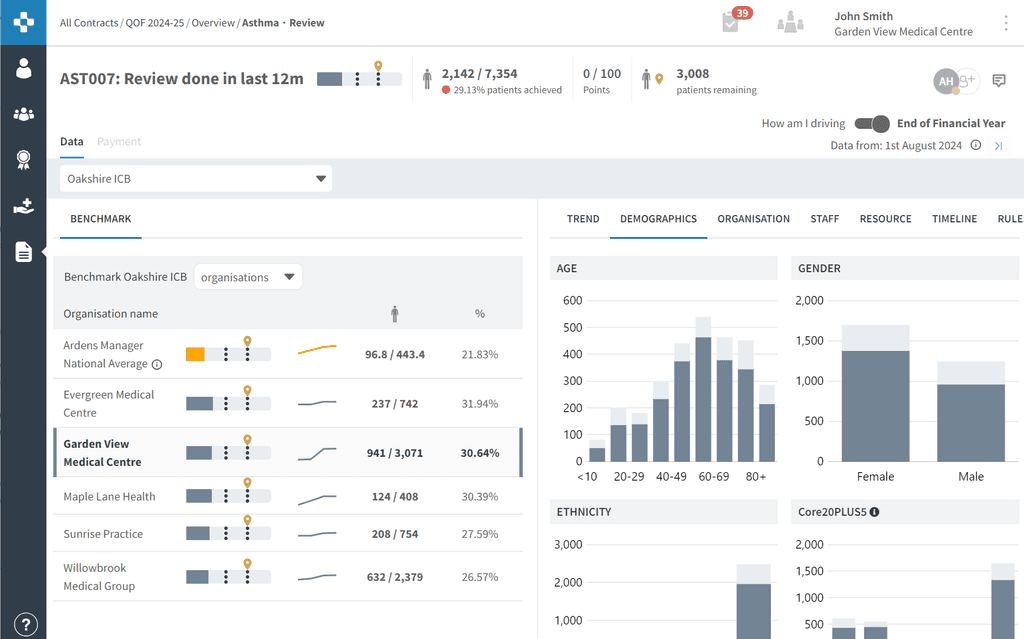
Understand your population health
Easy-to-use dashboards help you understand your population's health and take a proactive approach to managing capacity and patient care
Monitor targets & maximise income
Analyse reports to monitor performance and indicators, including national and local targets, contracts, best practice and CQC
Use time & resource efficiently
With standardised processes, reduce your administrative burden and proactively manage your workload, including assigning tasks
Understand your population health
Easy-to-use dashboards help you understand your population's health and take a proactive approach to managing capacity and patient care
Monitor targets & maximise income
Analyse reports to monitor performance and indicators, including national and local targets, contracts, best practice and CQC
Use time & resource efficiently
With standardised processes, reduce your administrative burden and proactively manage your workload, including assigning tasks
Update - Ardens Manager v.2
Now with patient data & detailed breakdowns to enhance efficiency & data-driven decisions.
Update - Ardens Manager v.2
Now with patient data & detailed breakdowns to enhance efficiency & data-driven decisions.
Dashboards
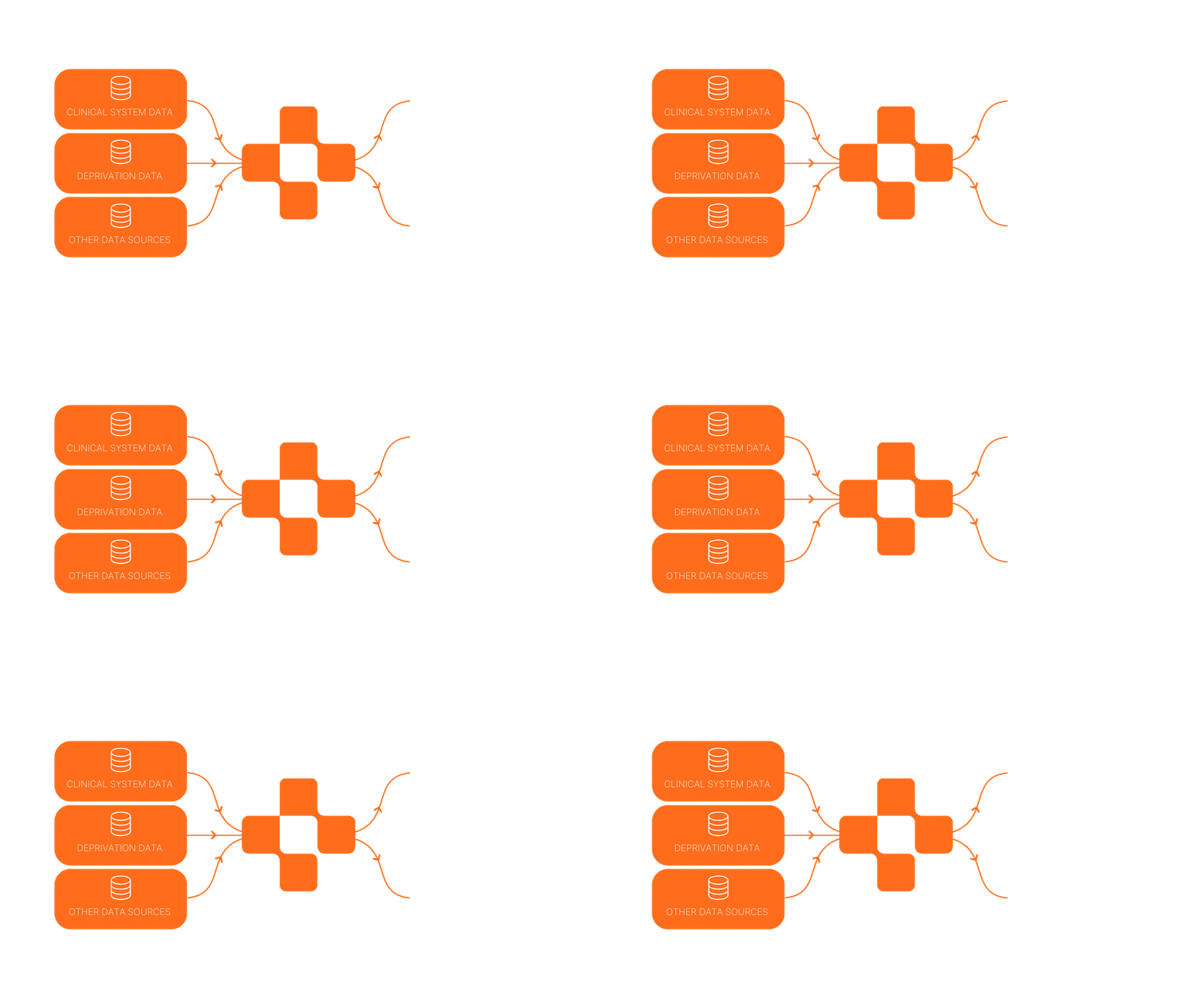
Ardens Manager automatically imports practice data daily from EMIS Web and SystmOne and pairs it with national data sets including the GP Patient Survey, Friends and Family Test (FFT), Workforce Data and GP Appointments Data (GPAD).
This data is used to populate a suite of dashboards giving you a single platform to monitor all your activity in one place. This makes all of your data immediately accessible and allows you to analyse performance, demand and capacity in a much more detailed way than using reports within your clinical system alone.
National Contracts
Our National Contracts Dashboards can be used at a practice, PCN, ICB, place or local authority level to manage contracts including QOF, Network Contract DES, and SMI Health Checks. The dashboards give you visibility on your progress against indicators and benchmarking across your area, enabling you to proactively manage your activity.
Local Contracts
Create customised dashboards for your local contracts to target and incentivise specific service areas and indicators. Ardens Manager bridges the gap between practices, PCNs, ICBs, councils and other commissioners by supporting end-to-end local contract management including drafting, signing, data collection and submissions, and payments.
Local Contracts
Create customised dashboards for your local contracts to target and incentivise specific service areas and indicators. Ardens Manager bridges the gap between practices, PCNs, ICBs, councils and other commissioners by supporting end-to-end local contract management including drafting, signing, data collection and submissions, and payments.
Services
Our dashboards, charts and trends help bring your data to life across primary care services. Drill down into appointments, prescribing, long-term conditions, referrals, vaccinations and national datasets such as GPAD to identify patterns, monitor performance, and take action where it matters most.
Services
Our dashboards, charts and trends help bring your data to life across primary care services. Drill down into appointments, prescribing, long-term conditions, referrals, vaccinations and national datasets such as GPAD to identify patterns, monitor performance, and take action where it matters most.
CQC
The Ardens Manager CQC Dashboard is available to all users and helps practices monitor performance against key areas reviewed during CQC inspections. Track quality, identify patients who may need further attention, and support safe, effective care in line with national guidance.
CQC
The Ardens Manager CQC Dashboard is available to all users and helps practices monitor performance against key areas reviewed during CQC inspections. Track quality, identify patients who may need further attention, and support safe, effective care in line with national guidance.
Features
Data Extraction & Sharing
Daily data extractions from the clinical system are automatically uploaded to dashboards through Strategic Reporting (IM1) and combined with national datasets. Customisable data sharing groups make it easy to benchmark practice and PCN performance to allocate resource and prioritise work.
Breakdowns
Drill down into appointment activity, workforce data and patient demographics, including age, ethnicity and deprivation score. Use these insights to support population risk stratification, target interventions, and address health inequalities.
Trends & Targets
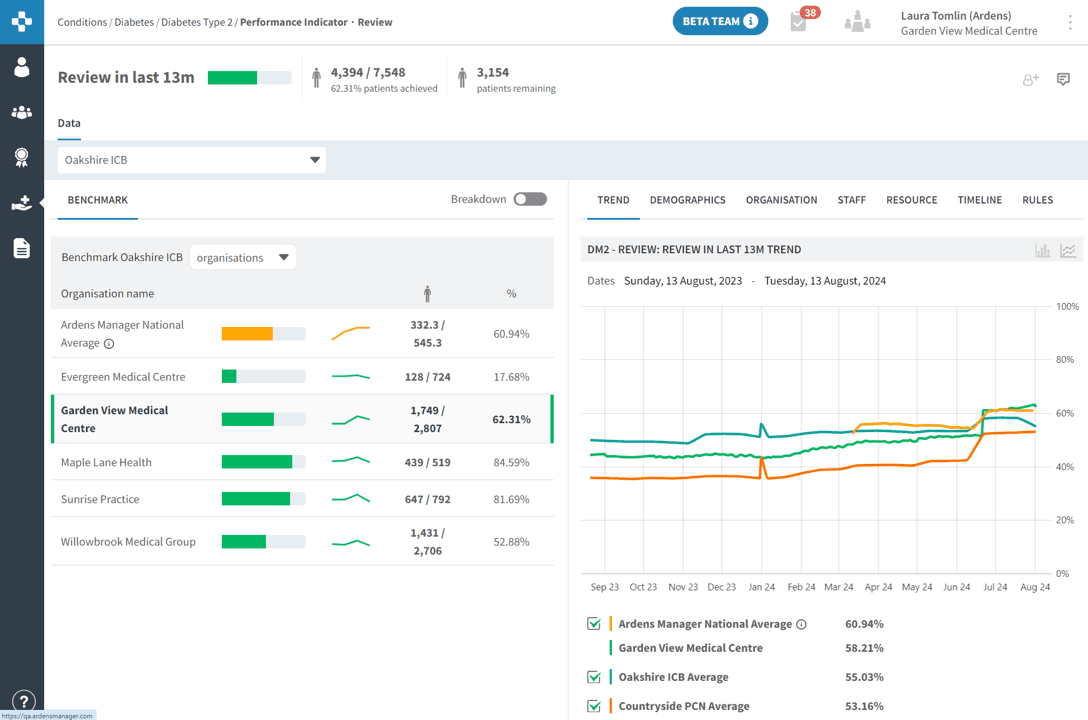
Gain a clear view of trends over time across every level of your organisation or group, from individual practices to ICBs. Set and monitor trajectory targets, identify areas requiring attention, and keep programmes on track to achieve planned outcomes and deadlines.
Workload Management
Create personalised to-do lists and allocate accountability by assigning reports to team members. Facilitate collaboration and track actions with comments, and maintain focused worklists by adding patient reviews and snoozing patients from reports.
Patient Data
Move seamlessly from population insights to patient action. View patient-level data directly within dashboards, identify priority patients, and take action to improve care and maximise income. With Patient View, instantly access key patient details alongside all relevant reports and dashboards.
Rules & Codesets
Gain confidence in your data with interactive business rules that provide the search parameters, SNOMED codes and groups behind each report. Use the Check Patient feature to understand exactly why a patient meets, or does not meet, the report criteria, making validation easier.
Features
Data Extraction & Sharing
Daily data extractions from the clinical system are automatically uploaded to dashboards through Strategic Reporting (IM1) and combined with national datasets. Customisable data sharing groups make it easy to benchmark practice and PCN performance to allocate resource and prioritise work.
Breakdowns
Drill down into appointment activity, workforce data and patient demographics, including age, ethnicity and deprivation score. Use these insights to support population risk stratification, target interventions, and address health inequalities.
Trends & Targets
Gain a clear view of trends over time across every level of your organisation or group, from individual practices to ICBs. Set and monitor trajectory targets, identify areas requiring attention, and keep programmes on track to achieve planned outcomes and deadlines.
Workload Management
Create personalised to-do lists and allocate accountability by assigning reports to team members. Facilitate collaboration and track actions with comments, and maintain focused worklists by adding patient reviews and snoozing patients from reports.
Patient Data
Move seamlessly from population insights to patient action. View patient-level data directly within dashboards, identify priority patients, and take action to improve care and maximise income. With Patient View, instantly access key patient details alongside all relevant reports and dashboards.
Rules & Codesets
Gain confidence in your data with interactive business rules that provide the search parameters, SNOMED codes and groups behind each report. Use the Check Patient feature to understand exactly why a patient meets, or does not meet, the report criteria, making validation easier.
Benchmark
Advanced Breakdowns
Trends
Assign & Comment
Solutions
Solutions
Solutions
Solutions
Interested in Ardens Manager?


Interested in Ardens Manager?
Interested in Ardens Manager?
Frequently asked questions
How frequently is data uploaded to Ardens Manager?
Can I add new reports onto the Ardens Manager dashboards?
What is the difference between Ardens Manager and Ardens Clinical?
How long does it take to get started onto Ardens Manager?
What kind of support and training does Ardens provide?
Where are the Ardens Manager servers located?

Products
Solutions
About
Support & Training

©2026 Ardens · All rights reserved.
Products
Solutions
About
Support & Training


©2026 Ardens · All rights reserved.